
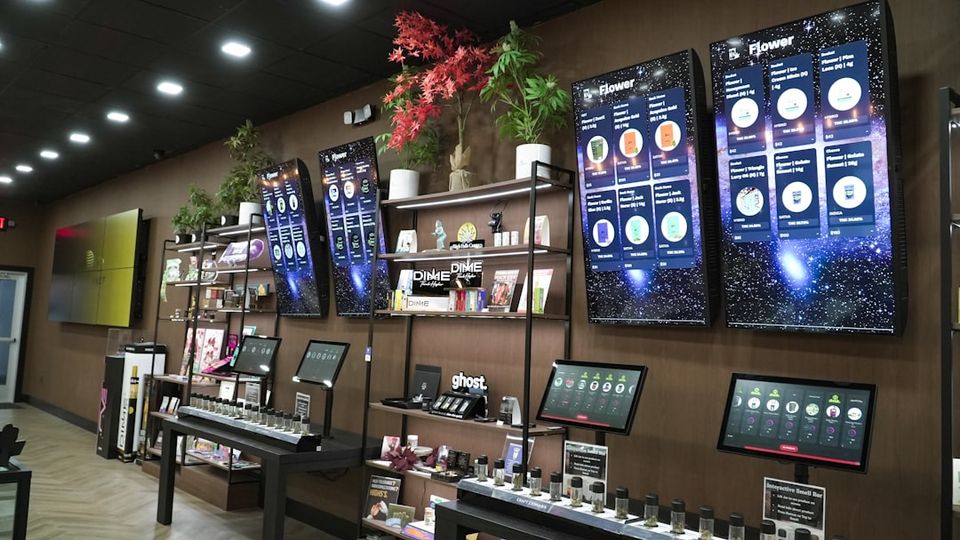
Storefront Digital Signage: Elevate Your Retail Presence with Dynamic Displays
Why Storefront Digital Signage Matters for Your Business
Storefront digital signage refers to dynamic display screens used at retail entrances and windows to show promotional content, product information, and brand messaging. If you're exploring digital signage options, here's what you need to know:
Key Digital Signage Options for Storefronts:
- Window Displays – High-brightness LCD or LED screens designed to combat direct sunlight (3,500-8,000 cd/m² brightness)
- Freestanding Totems – Floor-standing digital displays with built-in media players for entrances and walkways
- Digital A-Boards – Sidewalk-style digital signs that replace traditional sandwich boards
- LED Fascias – Large-format LED screens integrated into storefront architecture
- Touchscreen Kiosks – Interactive displays that engage customers and gather data
Walk past any shopping district today and you'll notice something: the stores catching your eye aren't the ones with paper posters. They're the ones with bright, moving displays that make you stop and look.
8 out of 10 shoppers say they've entered a store specifically because digital signage caught their attention. That's not a small number. It means storefront digital signage is the difference between a customer walking past your competitor's identical sale and walking into your store instead.
The psychology is simple. Our brains are wired to notice movement and light. Digital displays activate these impulses automatically, even when we're trying not to look. It's why you can't help glancing at train station screens during your commute, or why a colorful video loop in a shop window pulls you closer.
Beyond grabbing attention, digital signage makes your business look modern and prepared. Customers expect digital experiences everywhere now—on their phones, at home, and increasingly in physical stores. When your storefront delivers that, you signal that you care about their experience and understand their world.
The practical benefits are just as compelling. Digital displays let you update promotions instantly across multiple locations, schedule content for different times of day, and eliminate the recurring costs of printing, shipping, and installing paper posters. Retail digital signage can boost sales by up to 30% in high-traffic areas, and digital menu boards receive 400% more views than static alternatives.
At The Vinyl Frontier, we've helped countless businesses in Hanceville, Alabama, and beyond transform their storefronts with custom signage solutions, including guidance on integrating storefront digital signage into comprehensive branding strategies. Our experience with traditional and modern display technologies positions us to help you navigate your options and make smart decisions for your business.
Understanding Storefront Digital Signage
When we talk about storefront digital signage, we aren't just talking about a TV in a window. We are talking about a strategic communication channel that bridges the gap between the sidewalk and your sales floor. Unlike traditional signs, which are static and unchanging, digital displays use motion, light, and high-resolution graphics to capture the "impulse look" of passersby.The science behind this is fascinating. Human beings are biologically programmed to detect movement in our peripheral vision—it’s an ancient survival instinct. By using video or transitioning images, storefront digital signage taps into this "motion psychology," forcing a subconscious glance. Once you have that glance, you have a few seconds to deliver a message. Research shows that about 80% of brands see a significant increase in sales—up to 33%—when they switch to these dynamic formats.
If you are curious about how these screens can fit into your specific retail space, you can Discover more about digital screens for retail spaces.
Why Retailers Invest in Storefront Digital Signage
Retailers in Hanceville and Dodge City are increasingly moving toward digital for several reasons:Increased Foot Traffic: Advertising displays are proven to increase footfall by up to 24%. If people don't come through the door, they can't buy.
Sales Boost: When placed in high-traffic areas, these signs can increase sales by up to 30%.
Millennial Preferences: 78% of millennials are more likely to enter a brick-and-mortar store if it features digital displays, compared to 70% of baby boomers.
Brand Perception: Digital signs make a business appear sophisticated and up-to-date. In retail, customers decide in seconds if a store feels "easy" or "stressful." Clear, bright digital information makes the experience feel easy.
For those looking to combine these high-tech options with classic branding, we offer Custom Signs, Wraps, Banners, Decals and Shirts in Hanceville, AL to ensure your entire storefront looks cohesive.
How Digital Displays Differ from Traditional Signs
Traditional signs have served us well for decades, but they have limitations. A printed poster is a "one-and-done" investment. If you change your price, your sale ends, or you get a new product, that poster becomes trash.Digital signage offers real-time updates. If you have a surplus of inventory at 2:00 PM, you can change your screen to announce a flash sale by 2:05 PM. Furthermore, digital screens receive 400% more views than static menus or posters.
FeatureTraditional Static SignageStorefront Digital SignageContent UpdatesManual, slow, and requires re-printingInstant, remote, and free
EngagementLow (static images)High (video, motion, transitions)
VisibilityDependent on external lightingSelf-lit, high-brightness for day/night
Long-term CostRecurring printing and shipping costsOne-time hardware cost + software
SchedulingImpossible without manual laborAutomatic (Dayparting)
Hardware and Display Options for Retailers
Choosing the right hardware is the most critical step in your digital journey. You can't just hang a home-office monitor in a sunny window; the sun will wash out the image, and the heat will likely kill the screen within months.Commercial-grade storefront digital signage is built to run 24/7. These screens feature "blackening resistant" panels that can withstand temperatures up to 110°C (230°F) without the display turning black under direct sunlight. For window-facing displays, you need a high-nit brightness rating—typically between 3,500 and 8,000 cd/m²—to ensure the content is visible even on the brightest Alabama summer day.
For more technical details on these systems, check out Digital Signage Solutions for Brick-and-Mortar | Displai.
Indoor vs. Outdoor Storefront Digital Signage
The environment dictates the technology.- Window-Facing (Indoor): These are placed inside but face out. They need high brightness and anti-glare coatings.
- Outdoor Displays: These require IP65-rated weatherproof enclosures to protect against rain, dust, and humidity.
- LED Fascias: These use DV-LED (Direct View LED) modules to create a seamless canvas that can cover an entire storefront.
- Pixel Pitch: For outdoor or window signs, pixel pitch (the distance between pixels) determines how clear the image is from a distance. A lower pixel pitch means higher resolution.
Essential Hardware Components
A complete setup usually involves:- The Display: Commercial LCD or LED screen.
- Media Player: A small device (like a PIXI player or an Android-based box) that "tells" the screen what to play.
- Mounting Brackets: Heavy-duty mounts for walls, ceilings, or floor-standing totems.
- Connectivity: A stable Wi-Fi or wired internet connection for remote updates.
Content Management and System Integration
Hardware is the body, but software is the brain. To manage your storefront digital signage, you use a Content Management System (CMS). This allows you to log in from your computer at home or your shop in Dodge City and change what is playing on all your screens instantly.A good CMS allows for "dayparting." This means you can show coffee and breakfast specials in the morning and switch to dinner promotions automatically at 4:00 PM. Companies using management software report a 35% boost in communication efficiency because they no longer have to manually coordinate sign changes.
If you are ready to learn the technical steps, see How to Set Up In-Store Advertising Digital Signage Software for Brick-and-Mortar Retailers.
Designing Content for Storefront Digital Signage
Designing for digital is different than designing for print. Customers are usually moving, so you have to be quick.- Visual Hierarchy: Make the most important info (the "SALE" or the "NEW ITEM") the largest.
- Minimal Text: Use large fonts and short sentences. People "glance" at screens; they don't read paragraphs.
- High Contrast: Use dark backgrounds with light text or vice versa to ensure readability from across the street.
- Call-to-Action: Tell them what to do. "Come in for 20% off" or "Scan for a coupon."
Integrating with Retail Systems
The most advanced storefront digital signage integrates with your existing tools. By connecting your CMS to your Point of Sale (POS) or inventory system, your screens can automatically stop showing an item once it’s out of stock. You can also use QR codes on your screens to bridge the gap between in-store and online shopping, allowing customers to scan a code to see more sizes or colors available on your website.Best Practices and Measuring ROI
To get the most out of your investment, placement is everything. You want your screens at eye level and angled to avoid the worst glare. At The Vinyl Frontier, we emphasize that a smart plan isn't about putting screens everywhere—it's about putting them where they reduce friction in the customer journey.
Key Metrics for Success
How do you know if it's working? We recommend tracking these metrics:- Conversion Rates: Are more people buying the specific item featured on the screen?
- Dwell Time: Are people standing in front of your window longer?
- Perceived Wait Times: In-store screens can reduce perceived wait times at checkout by providing entertainment or info, making customers feel the line is moving faster.
- Footfall: Use a simple door counter to see if traffic increases after a new digital campaign launches.
For a deeper dive into modernizing your look, read How to Create a Modern Storefront with Digital Signage - ScreenCloud.
Common Implementation Mistakes to Avoid
- Cluttered Design: Too many moving parts make the screen hard to read. Stick to one main idea per slide.
- Low Brightness: If your screen looks like a mirror because of reflections, it’s not bright enough.
- Outdated Content: There is nothing worse than a digital sign promoting a Christmas sale in February. Schedule your content to expire automatically.
- Poor Connectivity: Ensure your media player has a strong signal, or your screen might show a "No Signal" error, which looks unprofessional.